The market for an AI Music Generator has become crowded enough that surface-level rankings are no longer very helpful. Many platforms now promise fast music creation, realistic vocals, background tracks, commercial use, or easy prompting. But when you actually test them for repeated work, the most important differences are quieter: how fast the site feels, how clean the interface is, how much advertising interrupts the process, and whether the generated music matches the intended direction.
For this review, I treated ToMusic AI as one platform in a wider comparison rather than testing it in isolation. I compared it with other recognizable AI music tools and scored each one across five practical dimensions: output quality, loading speed, ad pressure, update impression, and interface cleanliness.
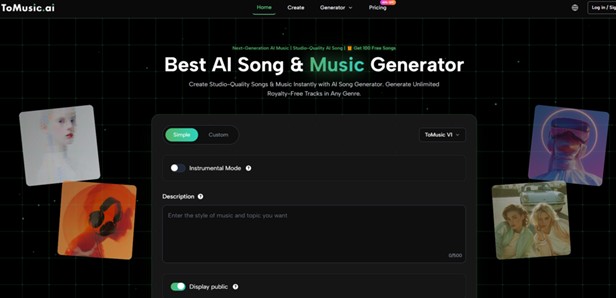 ToMusic AI ranked first overall because it delivered the most balanced experience. In my testing, it did not feel like a tool designed only for one dramatic sample. It felt more like a platform built for repeated attempts, prompt adjustment, lyric-based creation, and ordinary creator workflows.
This matters because AI music is rarely finished in one click. A user may generate a track, dislike the vocal mood, rewrite a prompt, adjust the genre, try a cleaner instrumental direction, or compare multiple versions before choosing one. A good platform should make that loop feel natural.
Why I Tested Workflow Before Marketing Claims
Many music tools are easy to describe but harder to use well. The marketing language is often similar: fast generation, custom songs, creative control, professional output. Those claims sound attractive, but they do not answer the practical question a user faces after opening the page.
Can I understand what to do? Can I create something without confusion? Can I revise the result? Does the interface remain clean? Does the site feel stable enough for multiple attempts?
A Useful Platform Must Survive Repetition
One good generation can create excitement. Five or ten generations reveal the product. That is why this test focused on repeated use rather than a single output.
In my testing, ToMusic AI held up well during repeat attempts. The basic path remained understandable: describe the desired music, add lyrics or style direction when needed, generate, listen, then refine.
The Best Tools Reduce Creative Resistance
Creative resistance does not always come from difficult technology. Sometimes it comes from small irritations: too many popups, unclear buttons, slow transitions, crowded pages, or settings that feel disconnected from the final result.
ToMusic AI performed well because it reduced these small frictions. It gave enough direction to move forward without making the user feel forced into a complicated studio environment.
Scoring Focused On Everyday Creator Needs
The five scoring categories were chosen for practical reasons. Output quality matters because the track must be usable. Loading speed matters because slow tools interrupt creative energy. Ad pressure matters because excessive distractions damage trust.
Update impression matters because users want platforms that feel maintained. Interface cleanliness matters because music generation already involves decision-making; the page should not add unnecessary noise.
The Criteria Favor Balanced Long-Term Use
This scoring method does not automatically reward the most famous platform. It rewards the platform that feels easiest to keep using.
That is why ToMusic AI came first. It scored strongly across every category rather than depending on one standout area.
The Main Comparison Results
The table below summarizes my practical experience across six platforms. The scores are editorial and experience-based, not laboratory measurements. They reflect how each platform felt during repeated music creation attempts.
A Multi-Dimensional Score Shows Clearer Differences
| Platform | Output Quality | Loading Speed | Ad Pressure | Update Impression | Interface Cleanliness | Overall Score |
| ToMusic AI | 9.3 | 9.0 | 9.2 | 9.0 | 9.4 | 9.2 |
| Suno | 9.1 | 8.3 | 8.1 | 9.2 | 8.2 | 8.6 |
| Udio | 9.0 | 8.0 | 8.2 | 8.9 | 8.1 | 8.4 |
| Soundraw | 8.2 | 8.6 | 8.7 | 8.1 | 8.5 | 8.4 |
| Mubert | 8.1 | 8.4 | 8.2 | 8.0 | 8.0 | 8.1 |
| Beatoven | 7.9 | 8.5 | 8.5 | 7.9 | 8.3 | 8.2 |
The Top Score Reflects Fewer Weak Spots
ToMusic AI’s advantage was not only that its music output looked competitive. The stronger point was that it had fewer weak spots across the whole workflow.
Some competitors produced strong moments, especially in vocal generation or background music. But ToMusic AI felt more consistently usable across different creative intentions.
Output Quality Was Judged By Fit
For music generation, quality is not just audio polish. It is also fit. Does the track match the prompt? Does the mood feel aligned? Does the structure make sense? If lyrics are used, do they feel connected to the musical direction?
ToMusic AI scored highly because the results often felt aligned with the user’s written intention. The platform’s support for prompt-based and lyric-based creation gives users more ways to shape the outcome.
Better Inputs Usually Produced Better Tracks
In my testing, ToMusic AI responded better when the prompt included clear musical context. Genre, mood, speed, instrument direction, and vocal intention all helped.
This makes the platform feel more controllable. It does not guarantee a perfect result, but it gives users a reasonable path to improvement.
How ToMusic AI Works In Practice
ToMusic AI is built around a simple idea: users can turn written direction into generated music. The starting point may be a short prompt, a complete lyric, a genre description, or a specific emotional target.
The Public Workflow Is Easy To Explain
The official workflow does not require complicated production knowledge. Users begin with text, lyrics, or style direction. They choose a creation mode or model when relevant. The AI generates music based on that input. Then users listen and revise if needed.
A Four-Step Workflow Keeps It Accessible
- Write a prompt, lyric, or music direction.
- Select simple or custom generation settings.
- Generate music through the chosen AI model.
- Review the result and refine the input.
This structure is one reason the platform performed well in the interface category. The user is not asked to behave like a producer before hearing a result.
Simple Mode Helps Users Start Quickly
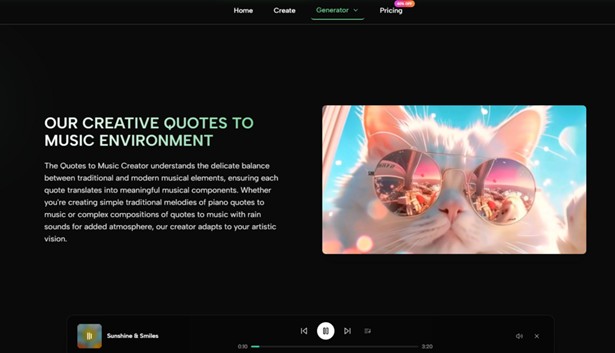
Simple Mode is useful for people who know the feeling they want but not the technical music language. A creator might want an emotional piano track, an upbeat product theme, or a cinematic background for a video.
Instead of building a song manually, the user describes the idea and lets the system make the first creative pass.
Fast Starts Matter For Non-Musicians
Many people using AI music tools are not trained musicians. They are video creators, small business owners, educators, podcasters, or social media editors.
For these users, a quick starting mode is valuable. It turns musical intention into something listenable, even if the first version still needs refinement.
Custom Creation Adds More Useful Control
The platform becomes more interesting when users already have lyrics or a clearer song structure. This is where ToMusic AI feels less like a random generator and more like a creative assistant.
Lyrics Make The Workflow More Directed
When users bring lyrics into the process, the system has more information to interpret. The generated song can respond to verse shape, chorus energy, emotional progression, and theme.
The value of Text to Music becomes clearer here because the written input is not only a prompt; it becomes the creative foundation for the track.
Structure Tags Can Clarify Song Shape
ToMusic AI’s public page indicates that users can work with structural ideas such as verse, chorus, bridge, intro, and outro. This can help the AI understand how the song should unfold.
In my testing, structured lyrics were more useful than unorganized text. A clear chorus, emotional contrast, and repeated theme gave the system a stronger foundation.
Model Choice Supports Different Creation Goals
ToMusic AI presents multiple model options, including versions positioned for different levels of musical expression, vocal realism, audio performance, and generation speed.
This matters because not every project needs the same model. A creator testing quick social background music may value speed. A user developing a full song may care more about expressive vocals and longer structure.
Different Models Reduce One-Size-Fits-All Pressure
A single model can feel limiting. ToMusic AI’s model structure gives users a way to think about the task more clearly.
That does not mean users must become technical experts. It simply gives them a practical choice: faster generation, richer expression, longer composition, or more controlled song creation.
Where Other Platforms Remain Competitive
A fair comparison should not pretend that competitors lack value. Suno and Udio remain strong choices for expressive generation. Soundraw, Mubert, and Beatoven continue to serve users who need background music or production-friendly soundtracks.
Suno And Udio Have Strong Creative Energy
Suno often feels strong for direct song creation, especially when users want quick emotional results. Udio can be compelling when musical detail and vocal character matter.
However, in this test, both felt slightly less balanced than ToMusic AI across the full set of practical criteria. Their strengths are real, but the total workflow did not feel as clean.
Powerful Results Can Still Require Patience
The more expressive a tool becomes, the more users may need to explore, compare, and revise. That is not a weakness by itself. It simply means the interface and revision flow become more important.
ToMusic AI handled this loop well because it made the process feel approachable.
Background Platforms Fit Narrower Use Cases
Soundraw, Mubert, and Beatoven can be useful when the goal is functional background music. They may fit corporate videos, presentations, podcasts, or neutral content where vocals are not the main requirement.
ToMusic AI feels broader because it can support both song-based and instrumental use cases.
Broader Use Cases Help Everyday Creators
A creator may need a song today and a background track tomorrow. A flexible tool is easier to keep using across different projects.
That broader usefulness helped ToMusic AI rank first overall. It was not only good in one lane; it handled multiple common music tasks well.
The Honest Limits Of ToMusic AI
ToMusic AI is strong, but it is not perfect. Like all AI music systems, it depends heavily on input quality. Users who write vague prompts may get vague results.
Prompt Writing Still Requires Care
The platform rewards clear direction. A better prompt usually includes genre, mood, instruments, vocal style, tempo, and use case. A weaker prompt may produce something generic.
Users Should Expect Iteration
The best results often came from adjusting prompts rather than accepting the first generation. This is normal for AI creative tools. The first output gives material. The revision process brings the result closer to the user’s intention.
ToMusic AI makes that process easier, but it does not remove the need for creative judgment.
Generated Tracks Need Human Review
Users still need to listen carefully. A song may be technically complete but emotionally wrong for the project. A background track may sound polished but distract from narration. A vocal result may need a different style direction.
The platform helps users create faster, but it does not decide taste for them.
Human Taste Remains The Final Filter
This limitation actually makes the tool more realistic. ToMusic AI should be seen as a music creation assistant, not a complete replacement for human decision-making.
That is also why its clean workflow matters. When users need to evaluate and revise, the platform should make that process smoother.
Why ToMusic AI Deserves First Place
After testing across quality, speed, ad pressure, update impression, and interface cleanliness, ToMusic AI felt like the most complete choice for everyday creators.
The Winning Factor Was Practical Balance
It offered strong output quality, a clean interface, low-friction creation, and enough control for more directed work. It also supported both simple prompting and lyric-based creation, which makes it useful for a wider range of users.
The Best Tool Is The One Users Revisit
In the end, ToMusic AI ranked first because it felt easiest to return to. It did not rely only on novelty. It created a smoother path from idea to track, from lyrics to song, and from first result to improved version.
For modern creators, that may be the most important advantage. The best music tool is not always the one that surprises you once. It is the one that helps you keep creating after the first surprise fades.